My WordPress website shows another website!?!!

Als je WordPress-website ineens verwijst naar een andere website, kan dit betekenen dat je website gehackt is. Hackers kunnen scripts gebruiken om je website aan te passen en door te verwijzen naar hun eigen website, wat kan leiden tot ongewenste reclame of andere schadelijke activiteiten. Het is essentieel om snel actie te ondernemen als je dit probleem opmerkt.

De website van de hacker

De website van de hacker wordt vaak gebruikt om geld te verdienen. Ze kunnen producten verkopen of andere frauduleuze activiteiten uitvoeren om winst te maken. Het is belangrijk om te voorkomen dat je website wordt gebruikt als een platform voor de activiteiten van de hacker.

Hou deze hackers buiten je website

Het is van cruciaal belang om ervoor te zorgen dat hackers geen toegang krijgen tot je website. Hoewel WordPress zelf over het algemeen veilig is, kunnen kwetsbaarheden in plugins een opening bieden voor hackers. Het is daarom belangrijk om je website goed te beveiligen.

Bescherm je WordPress website

Het gebruik van een betrouwbare beveiligingsplugin is een van de beste manieren om je WordPress-website te beschermen tegen hackers. Een antivirus- en beveiligingsplugin zoals iThemes Security PRO kan je helpen je website te beveiligen door verschillende functies, zoals het verbergen van het admin-gedeelte, het blokkeren van herhaalde pogingen, het beheren van veilige wachtwoorden en het maken van backups van je database.

Enkele functies van iThemes Security PRO:

– Het verbergen van het admin-gedeelte van je website om het moeilijker te maken voor hackers om toegang te krijgen.
– Het beveiligen van kwetsbare bestanden op de server, zodat hackers er geen toegang toe hebben.
– Het blokkeren van herhaalde pogingen om in te loggen, om brute force-aanvallen te voorkomen.
– Het afdwingen van het gebruik van sterke wachtwoorden om de beveiliging te verbeteren.
– Het maken van backups van je database, zodat je je website kunt herstellen als er iets misgaat.
– Het bijhouden van bestandswijzigingen, zodat je eventuele verdachte activiteiten kunt opsporen.
– Het informeren van jou over eventuele aanpassingen in je website, zodat je snel kunt reageren op verdachte activiteiten.

Het is belangrijk om regelmatig je beveiligingsinstellingen te controleren en ervoor te zorgen dat je WordPress-website up-to-date is om de beste bescherming te bieden tegen hackers. Met de juiste beveiligingsmaatregelen kun je de kans op een gehackte website aanzienlijk verkleinen en de veiligheid van je bezoekers en gegevens waarborgen.

Hacked content detected, now what?

Als je een bericht van Google ontvangt waarin staat dat er gehackte inhoud is gedetecteerd op je WordPress-site, kan dat inderdaad erg vervelend zijn. Hier zijn enkele antwoorden op de vragen die je mogelijk hebt:

Hoe komt het dat de website plotseling gehackt is?

Een van de meest voorkomende oorzaken van een gehackte website is een kwetsbare plugin of thema. In ongeveer 15% van de gevallen is WordPress zelf de boosdoener, maar dat gebeurt meestal alleen als je WordPress al langer dan 1-3 jaar niet hebt bijgewerkt. Hackers testen plugins om kwetsbaarheden te vinden waarmee ze kunnen inbreken op WordPress-websites. Zodra ze een lek vinden, verspreiden ze een script op internet dat zoekt naar alle websites met die specifieke plugin, waarna ze hun injectie uitvoeren. Deze injectie kan bestaan uit kwaadaardige code waarmee ze reclame kunnen maken via jouw website, wat vaak wordt gezien als ongewenste reclame of phishing door Google.

Wat kan ik doen om de website weer te herstellen nadat er gehackte inhoud gedetecteerd is?

De gemakkelijkste en meest betrouwbare manier om je website te herstellen en te beveiligen is door een gespecialiseerd bedrijf zoals WPbeveiligen in te huren. Zij hebben ervaring in het herstellen en beveiligen van WordPress-websites en kunnen je site weer veilig maken. Als je WPbeveiligen inschakelt, krijg je vaak ook garanties op het herstelproces, wat voor extra gemoedsrust zorgt.

Als je echter zelf je WordPress-website wilt herstellen, zijn hier enkele basisstappen:

1. Gebruik de gratis scanner van Sucuri om te achterhalen waar de gehackte bestanden zich bevinden.
2. Maak een volledige backup van je website, inclusief alle bestanden en de database.
3. Verwijder de gehackte bestanden en kwaadaardige code. Let op dat deze code vaak geëncodeerd kan zijn om ontdekking te voorkomen.
4. Update alle plugins, WordPress zelf en waar mogelijk ook het thema naar de nieuwste versies.
5. Beveilig je WordPress-website met een goede antivirusplugin specifiek voor WordPress.

Houd er rekening mee dat het herstellen van een gehackte website een complex proces kan zijn en dat er mogelijk meer stappen nodig zijn dan hierboven beschreven. Het is altijd verstandig om een expert in te schakelen als je niet zeker weet wat je doet.

Hoe voorkom ik de melding van Google dat er gehackte inhoud gedetecteerd is?

Om te voorkomen dat Google gehackte inhoud detecteert op je website, kun je de volgende maatregelen nemen:

1. Gebruik een goede antivirusplugin specifiek voor WordPress om potentiële bedreigingen te detecteren en te blokkeren.
2. Verwijder ongebruikte plugins en thema’s van je server.
3. Beperk het aantal geïnstalleerde plugins tot een minimum en houd ze up-to-date.
4. Regelmatige updates van WordPress, plugins en thema’s zijn essentieel. Maak altijd een backup voordat je updates uitvoert.
5. Controleer of je hostingprovider goede beveiligingsmaatregelen heeft om aanvallen tegen te houden en de gegevens van websites van elkaar te scheiden. Dit is vooral belangrijk in gedeelde hostingomgevingen.

Door proactief te zijn en goede beveiligingspraktijken te volgen, kun je de kans op een gehackte website aanzienlijk verkleinen.

WordPress install

Installing WordPress requires a hosting package with at least 1000 MB of disk space to accommodate WordPress and future content like text and images. The hosting package should also include a database, which is often provided by default with the hosting plan. When you order a hosting package, you’ll receive an email containing certain details:

1. FTP (File Transfer Protocol) details: These credentials give you access to the server where you will place WordPress in step 3. They usually include a Hostname (e.g., ftp.example.com), Username (e.g., example_user), and Password (e.g., &Y#HLlk214h). You’ll use these details in an FTP program like Filezilla to upload WordPress to the server.

2. MySQL database details: These credentials are used during the WordPress installation in step 4. They typically include the Database name (e.g., example_dbname), Database username (e.g., example_uname), and Password (e.g., &Y#HLlk214h).

Once you have a hosting package, you can proceed with the following steps:

Step 1. Download WordPress: You can download WordPress for free from WordPress.org. After downloading, extract the files using a ZIP or WINRAR program.

Step 2. Place WordPress on the server: Use the FTP credentials to connect to the server using an FTP program like Filezilla. Once connected, navigate to the “WWW” or “HTTPDOCS” folder (often referred to as the root of your site) and upload the files you extracted in Step 1.

Step 3. Link WordPress to the database: Access your domain in a web browser to initiate the WordPress installation. During this process, you’ll be asked to provide the MySQL database details, such as Database name, Database username, and Password. The Database host is usually “localhost,” but you can find a specific address in the email containing your hosting information. For added security, consider changing the table prefix during installation.

Step 4. You’re done! After completing the installation, you can access the WordPress admin panel by going to www.your-website-address.nl/wp-admin. Enter the username and password you chose during installation to access the WordPress admin, where you can manage your WordPress website.

It’s important to note that while WordPress is a robust system, its popularity and free accessibility make it a target for hackers. To enhance website security, consider using a reliable WordPress security plugin, which can address over 100 known vulnerabilities and make it more difficult for hackers to exploit your website.

Statistieken over de veiligheid van websites

With over 1 trillion websites (1,000,000,000,000!!), the internet is indeed a massive market for both website visitors and hackers. Cybercriminals see the potential to infect even a small percentage of websites with their own advertisements, which could yield significant results. WordPress, Joomla, and Magento, being popular content management systems, are particularly attractive targets for hackers, given that one-third of all websites are built on these platforms.

Sucuri’s report indicates a significant increase in cybercrime in recent years. However, the success of hackers in mass hacking websites largely depends on how websites are managed and secured.

While WordPress receives frequent updates and security enhancements from its developers, plugins remain a weak link in the security chain. Plugins with Cross-Site Scripting (XSS) vulnerabilities can leave websites exposed to injections and attacks. Popular plugins like Revslider, Gravityforms, and Timthumb, while powerful, are sometimes not updated frequently enough by users, making them susceptible to exploitation.

The most common issues seen in hacked websites include backdoors, malware distribution, SEO spam, unauthorized email sending, and website defacement. These problems can seriously harm a website’s reputation and compromise its functionality.

To defend against hackers, it’s not enough to rely solely on timely updates. The use of an effective antivirus plugin for WordPress that closes over 100 known vulnerabilities and intercepts hacker methods becomes crucial to prevent the website from becoming an easy target.

For further protection and more tips on securing your WordPress website, you can explore the article ‘Serieus, je moet je WordPress website nu echt beveiligen’ (in Dutch).

5 ways to stop brute force attacks

The iThemes Security PRO NL plugin offers five ways to prevent brute force attacks on your WordPress website:

1. 404 Detection: Bots and hackers often try to access non-existent pages or files on your website in search of vulnerable plugins or themes. iThemes Security PRO NL tracks the number of attempts an IP address (bot/PC) makes to retrieve unavailable pages or files. After a certain number of 404 errors, the security feature denies access to the website temporarily, and if the attempts continue, the IP address is blocked in the .htaccess file, preventing access to the entire website.

2. Brute Force Protection (Automated): This feature focuses on the login panel. Failed login attempts are recorded, and after a certain number of incorrect login attempts, access to the login page is temporarily denied. You can set a maximum number of attempts and the time required before new attempts are allowed. Afterward, the IP address attempting the logins is blocked, preventing continuous login attempts through brute force.

3. Disabling XML-RPC: XML-RPC can be exploited for various login attempts. This feature allows you to disable XML-RPC via the plugin if you do not use Jetpack or external apps to access WordPress.

4. Absent Mode: If you typically update your WordPress website only during certain hours of the day, you may not need the login page accessible 24/7. The Absent Mode feature lets you set a specific time when the login page is or isn’t reachable.

5. Blocking Brute Force Attacks per IP: The plugin provides a field where you can enter IP addresses to block. If you discover many brute force attacks coming from specific regions or countries where your website’s target audience is not located, you can add those IP addresses to the ban list, preventing them from launching brute force attacks on your website.

For more information about this plugin and how it prevents brute force attacks, you can follow the provided link.

SSL – What is that?

You provided a concise and accurate explanation of SSL (Secured Socket Layer) and its purpose. Here’s a summary of how SSL works:

SSL establishes a secure connection between two computers over the internet or an internal network. The data transmitted by a website is encrypted, ensuring that only the intended recipient with the encryption key can read it. This prevents fraudsters or hackers from intercepting and reading the transmitted information.

SSL is commonly used, especially for webshops where sensitive data like credit card or bank information is transmitted. The encryption ensures that this data is sent securely.

You can easily identify if a site is using SSL by looking for a green padlock icon in your browser’s address bar, indicating a secure connection.

To obtain an SSL certificate for your website, you can request one from your hosting provider. It may involve some costs, and your website may need adjustments to work properly with the new secure connection method, such as updating links and images from “http” to “https.”

Remember, SSL is crucial for securing sensitive data and maintaining trust with website visitors.

SSL for WordPress

Securing your website with SSL can be beneficial in certain situations when it comes to protecting a WordPress website from hacking attempts.

Does SSL have any use in securing a WordPress website?

When it comes to automated attacks from hackers and scripts that target WordPress plugins, themes, and users directly: No

When it comes to hackers personally targeting your WordPress website: Yes

Why SSL may be necessary to secure your WordPress website

If there is a significant interest in hacking a website, a hacker may personally focus on your website. This doesn’t happen frequently, as in most cases, hackers use automated scripts to gain access to websites. However, in cases where automated methods fail, hackers may resort to other methods, making encrypting the connection between you and your WordPress website necessary.

SSL becomes essential when there is valuable information or money involved.

The moment you log in to your WordPress website

Logging in to your WordPress website involves a series of exchanges between your computer and the WordPress login panel. Here’s a simplified breakdown of the process:

  1. You send a command from your computer by typing the admin address. (Make sure to have good antivirus software)
  2. This goes to your router (Ensure it has good encryption and a strong password)
  3. Then to your internet service provider
  4. It travels through several intermediary steps
  5. To reach the server (a computer running on Linux or sometimes Windows)
  6. The server responds and sends the admin page back to your PC & browser. (Beware of browser malware/trojans)
  7. Then you enter your username & password, which travels back through all the previous steps without encryption.

Now you understand why doing this through SSL encryption is important!

  • This is why you should not click on pop-ups from web pages (they may contain malware)
  • This is why you need a good browser (avoid using outdated Internet Explorer)
  • This is why your WordPress website must be secured to prevent data from being sent to hackers

The internet is a serious place, just like you wouldn’t leave your house key lying around or your windows open, you need to take security seriously on the internet. Or you could end up waiting until someone has copied your key… CLICK

This is how a hacker earns from your website

Placing even a small piece of code on your website can allow a hacker to display advertisements on your website, which can earn them money through affiliate programs.

How much money does a hacker make?

A simple hacker may earn around 10-50 euros per month by targeting a few websites. However, if a hacker or a team of programmers cracks a plugin and gains access to 10,000+ websites through that plugin, the earnings can be significant.

geld

There have been cases where companies with programmers nearly go bankrupt and resort to hacking websites to generate income through advertising networks or selling their own products. Such actions harm many websites and can quickly generate substantial profits for the hackers.

How innocent is hacking a site?

Injecting a link into a website. That should be harmless, right?
WRONG! It is an intrusion into someone else’s property. It robs the victim of their income and the investments made to build a good website.

Hacking, whether it targets small sites or large business websites, is a criminal act.

The hacker gains, and you lose


Your Google ranking takes a hit..

Google will notice that your website is displaying information that doesn’t belong to it.

Especially in the case of adult content or illegal pharmaceuticals, your reputation will quickly deteriorate.

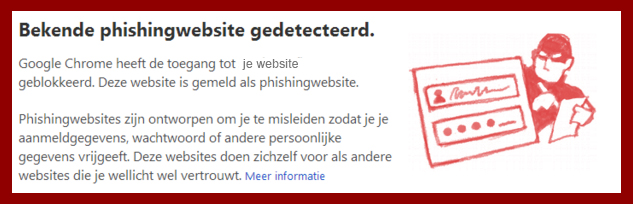
If a hacker’s code redirects your website to another site or offers unsafe files through your website, Google may choose to block access to your website with a red warning screen. This warning appears on Google Chrome browsers on desktops, tablets, and phones, as well as in the description of your website in Google search results.

google blokkeerd website uit veiligheid

You lose potential customers..

Customers visit your website or online shop but see that it is unsafe, so they perform a new search on Google and end up at your competitor’s website.

Restoring a hacked website..

You need to ensure that your website is free from viruses and hacks. Searching for malicious code takes time for every programmer, not to mention finding and closing backdoors; otherwise, the website may be hacked again within a few days!

Preventing your website from being hacked

A hacker uses specific tricks and exploits vulnerabilities in plugins and WordPress. These can include forms, upload directories, the well-known login address, files containing sensitive information, the database, and more.

We secure WordPress websites against hackers, offering hack-free guarantee!

Get your WordPress website secured now

The difference between Widgets – Plugins – Themes – Templates

The Widgets

These are flexible additions to your website that you can place in specific areas such as the Sidebar (beside your content) or in the Footer (at the bottom of your website).

Some characteristics of widgets:

  1. Easy to move around by dragging them with the mouse
  2. Many popular plugins have widgets available to display information
  3. Can be used in fixed locations like the Sidebar, Footer, and sometimes the Header
  4. Widgets are designed as small components of your website

Click here to learn more about how widgets work.

The Plugins

These are additions to your website, such as a contact form or SEO tools. Plugins are developed to expand the functionality of your website and also to enhance your WordPress Dashboard.

Some characteristics of plugins:

  1. Average size between 1-2 MB
  2. Can be downloaded for both free and paid
  3. Provide WordPress with endless possibilities
  4. Sometimes the cause of a hacked website
  5. Load scripts, which can make your website slightly slower
  6. Need to be regularly updated

Click here if you want to learn about plugins.

The Themes

A theme contains the design of your pages. Sometimes it’s only for the homepage, blog pages, and subpages, but in luxury themes, it can also style your contact forms and landing pages.

Some characteristics of themes:

  1. Can be downloaded for both free and paid
  2. Determine 70% of what a visitor thinks about your website
  3. Can sometimes be vulnerable, leading to a hacked WordPress website
  4. Affect the speed and readability of your website for both visitors and Google

The Templates

These are individual pages. Think of a landing page, a contact page, or a style for blog posts or portfolio items.

Some characteristics of templates:

  1. They are easy to add to your current theme
  2. A custom template can save a lot of work if you have many pages with a specific layout
  3. By loading code specifically on one template, you ensure that other pages remain fast

Be selective with plugins & themes

Every theme and plugin adds code to your website. Among that code, there may be vulnerabilities that allow hackers and scripts to enter your website, such as placing their advertisements.
As of the writing of this article, there are 4000+ known vulnerabilities in themes and plugins that are often exploited by automated scripts (bots).

Limit the number of plugins to what you truly need and do not keep unused plugins and themes on the server, as they can also be accessed by hackers! Reduce the attack surface.

Finally, regardless of the theme or the number of plugins on your site, always use a good antivirus plugin for WordPress to limit the capabilities of hackers and scripts.

Backing up WordPress!

A backup of your WordPress website is crucial, as a lot of time and money goes into creating a good website! Think about writing content, finding the right plugins, and sourcing beautiful images.

A reliable backup is your savior in case anything happens to your website. Especially the WordPress database, where all your posts and pages are stored, is crucial not to lose.

It’s important to have a complete backup of all the data on your server and the database containing all the information.

You can download Updraftplus Premium or Free here.

Making a complete backup with just one click

We have tested several free plugins, and one of the best free plugins we have come across is Updraftplus. This plugin allows you to create a backup of all your data, including the database!

backup restore wordpress

Restoring a backup

Having a backup is important, but it gets even better: Updraftplus also allows you to restore your plugins, themes, and more from the backup!

backup-restore-wordpress

This is useful when your website gets hacked, when you accidentally delete a plugin, or when an update of a plugin causes issues with your website. This happens quite often!

More advantages of Updraftplus

Updraftplus offers many features in its free version, including:

  • Restoring only plugins and themes
  • Writing the backup to another server
  • Automating backups based on hours, days, or weeks
  • Translated into Dutch
  • The ability to count the size of plugins, themes, etc.

Cloud services

If you want to use Dropbox or another cloud service, they even offer premium add-ons to further expand the functionality of the plugin.