
A useful feature of Sucuri
Sucuri Security offers a WordPress plugin that you can find in the WordPress plugin library under the name Sucuri Security. While it may not be an all-in-one solution against hacks and has some limitations, it does have one very useful feature that can save you a lot of time, especially if you have many plugins installed.
The Plugin Reinstaller
If your website uses 20-30 plugins (which is, of course, too many and poses a significant security risk), it can become a cumbersome task to remove each plugin, download a clean installation, and then upload it back to the plugins directory, especially when there are hacker files present.
Sucuri has a feature for this scenario where you can select all plugins at once and have them removed and reinstalled with a clean version in one go! This saves you a lot of time and effort.
You can find this feature under “Post Hack > Reset plugins.”
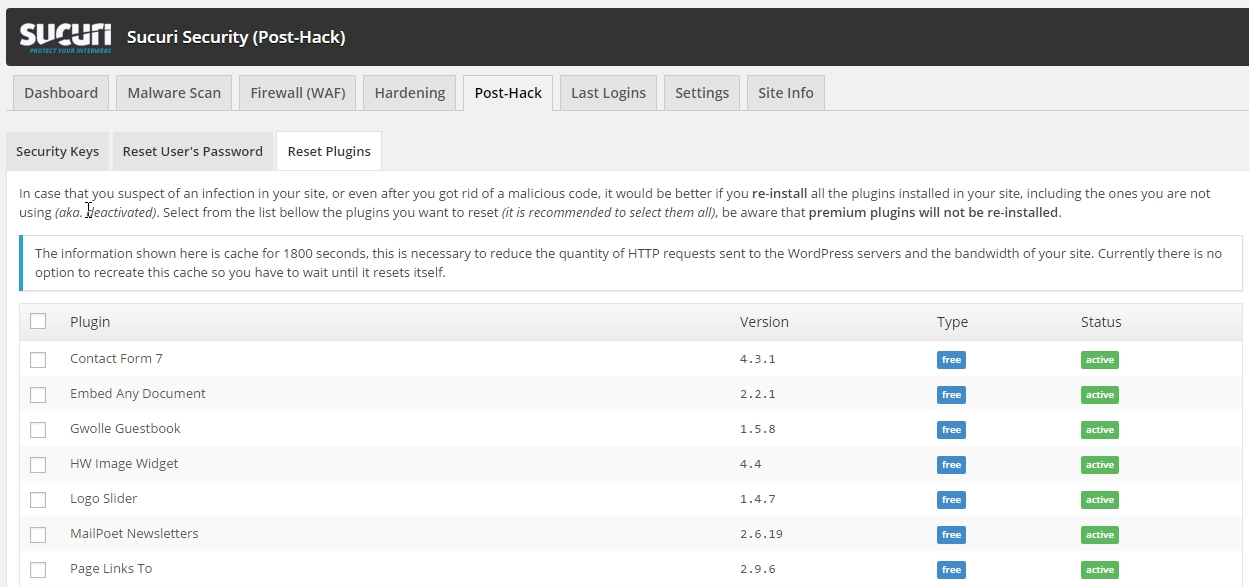
You might be wondering if you can simply update a plugin instead. While updating a plugin does modify some files, it won’t remove any hack files that may be present.
In summary, download the Sucuri plugin and use the reset plugins function!
And then?
After using the Sucuri plugin to reset your plugins, it’s a good idea to install a robust security plugin like Ithemes Security PRO to enhance the security of your WordPress website.
 Math Schol
 +31 858 200 807
 info@wpbeveiligen.nl

Leave a Reply
Want to join the discussion?Feel free to contribute!